October 8, 2021
The Ideal QA Process in Digital Advertising


Do you need to implement a new Facebook pixel event but don’t have the web development resources to do so? Do you have different unique conversion events you want to optimize towards that Facebook currently does not offer? Do you want to avoid tedious back and forth emails regarding pixel event implementation? If you answered yes to these questions, you might be happy to hear that you can easily solve your problems with custom conversion events on Facebook.
Custom conversions are URL-based pixel events you can leverage for paid social advertising campaigns. You can optimize towards them using oCPM bidding, as well as evaluate “cost per ‘x’” metrics associated with the custom conversions you create.
If you run a lead generation business that requires users to fill out a profile or prequalify in some way for the services offered, you may find custom conversions especially useful for tracking unique events in your sales funnel. For example, if you offer loan refinancing, you would want to qualify people based on minimum credit score. Using the unique URL of the landing page that someone lands on after getting their credit score approved, you could then create a custom conversion event to optimize towards.
By creating custom conversion events, you can set new unique KPI goals around more downstream steps in the sales funnel. Optimizing towards more highly qualified leads in your paid social campaigns can help you achieve vital lead volume targets for your sales team.
1) Take the URL of the landing page associated with the conversion event you want to optimize towards
2) Select “Custom Conversions” in Ads Manager
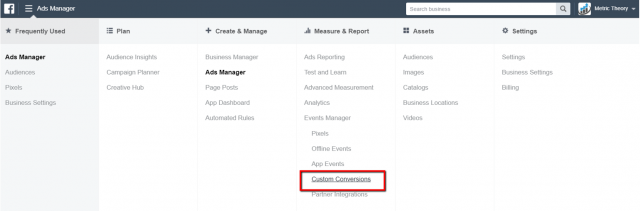
3) On the Custom Conversions page, select “Create Custom Conversions”

4) Paste the URL associated with the custom conversion event you’d like to track

5) Name the event
6) Select the pixel event category you would like associated with your custom conversion. Facebook uses its generic pixel events to categorize the type of custom conversion type you want to create. If there is not a listed event similar to the custom conversion you are creating, you can select “Other”

Now that you know how to create custom conversion events, you are set to start building ad sets to optimize towards them. Happy optimizing!
